Skip to content
HubSpot background (3)

ExpressOffers Leads (COMING SOON)

Transform Your Real Estate Business with ExpressOffers Leads 

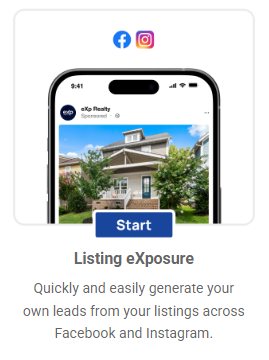
Listing eXposure

Now Live!

Inquire below to learn more!

Program Benefits

  • Build your buyer and seller pipeline with every listing.
  • Simplify PPC ads — no setup headaches.
  • Keep full creative control with your own photos or videos.
  • Capture leads directly from Facebook/Instagram forms.
eXpRealty_MakingItRain_WHITE

What you need to know about Making It Rain

• Making It Rain offers multiple lead gen products including "ExpressOffers Leads"
• Generate leads to promote your business! 
• No referral fee due at closings - the leads are your leads
• “Training Hub”- helpful CRM & lead conversion resources


The theme… this is an internal agent centric program. 

No extra platform fees or set-up fees
Little or No Commitment. Month to Month. 
    • Any product with a commitment term is month to month after term is completed.
    • Any commitment is stipulated in the signup process terms and conditions
Easy access to the eXp Making It Rain Team
Flexibility (changes to target areas, budget, etc.)

What agents are saying about ExpressOffers Leads...

What lead information will I receive?

Facebook (& Instagram) in-channel lead forms help provide quality information by keeping consumers on the platform, which reduces friction and increases the likelihood of accurate, completed submissions. These forms auto-fill user details from their Facebook profiles and can be customized to ask qualifying questions, allowing MIR to gather targeted, high-intent lead data efficiently.

Lead information collected:

  • Name
  • Email
  • Phone
  • State
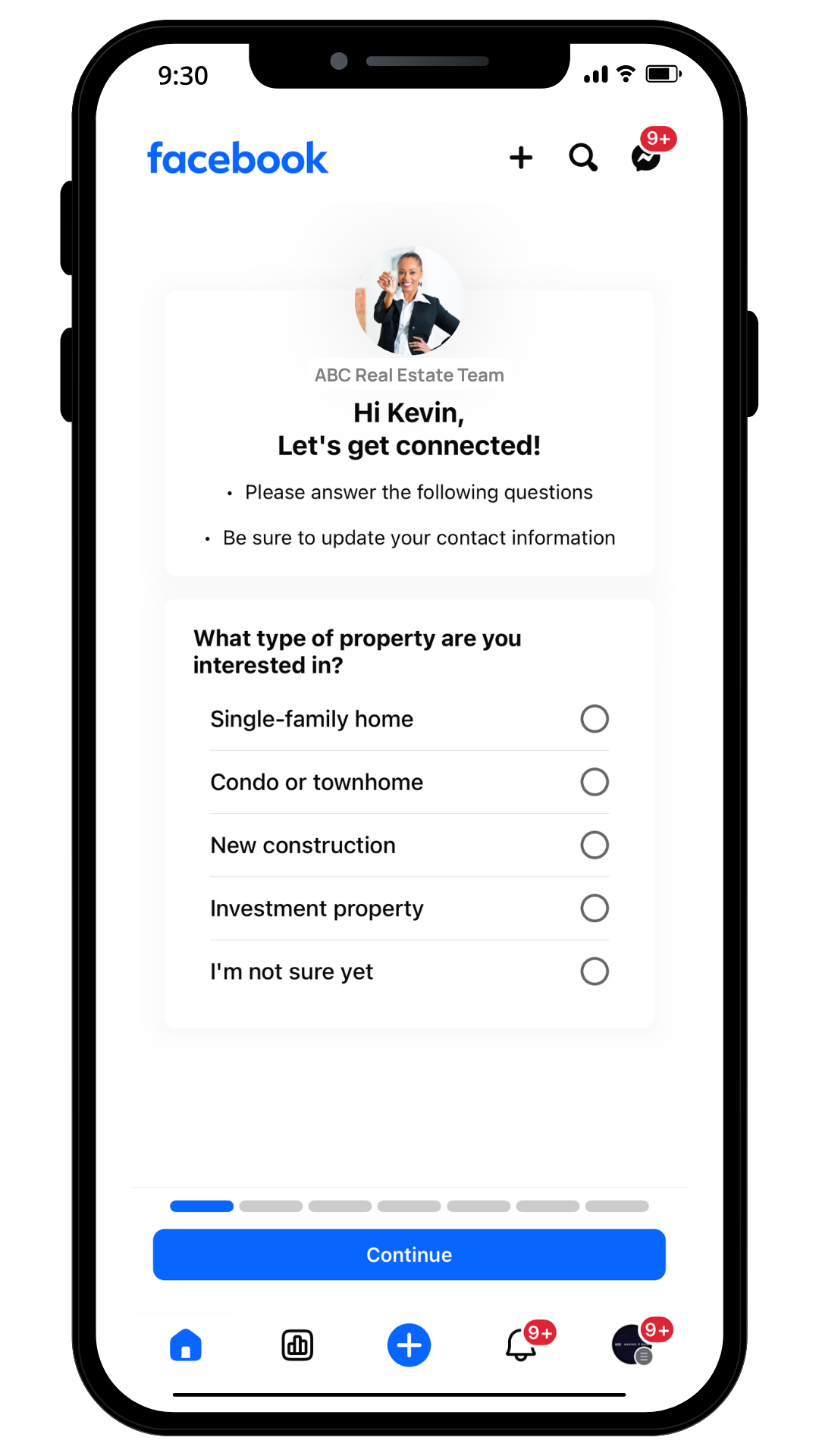
  • What type of property are you interested in?
    • SFR, Condo/Townhome, New Construction, Investment, I'm not sure)
  • Where are you in your home search process?
    • Just browsing, 3-6 months, Actively looking now, Already working with an agent)
  • Do you need to sell a current home before buying?
    • Yes/No
  • Have you been pre-approved for a mortgage?
    • Yes/No, I'm a cash buyer
  • What’s most important to you in your next home? [open text input]
ExpressOffers Leads are online seller leads captured via Facebook/Instagram forms. While these leads show intent based on the ExpressOffers value proposition, not all will convert or provide fully accurate information.
LE - Lead Form 1a
LE - Lead Form 1a (1)
Phone Mockups (3)

What do the ads look like?


Customize your ad's appearance by using a single photo, multiple photos, or a video.

For convenience, you can either automatically import the "main image" from your listing or for more customization, upload your own listing video.


How you can recieve the leads.

There are several options for directing your leads.

BoldTrail (kvCORE)

Use your kvCORE parse email and we'll email leads right into your kvCORE Smart CRM.


Email Notification

In your MIR Dashboard, navigate to "Account Settings" and then "Lead Alert Notifications" to add one or more email addresses for receiving lead notifications.

Your leads will also sit in the "Leads" section of your MIR Dashboard.

Other CRMs

This lead parsing feature for Lofty & Follow-Up Boss is in development and coming soon.

Just as we can send leads to your Boldtrail/kvCORE, we’re also working on integrating with other CRMs. 

About the Leads

- Listing eXposure leads are generated through online Facebook/Instagram lead forms.
- Lead information may vary in accuracy; autofill improves validity but isn't guaranteed.


- Not every lead will convert or result in a sale.
- Conversion benchmarks are not yet finalized, but seller intent may yield stronger results than general valuation inquiries.

Important Note:

CDN 1 Currently, the ExpressOffers program is not available in Canada, which means "ExpressOffers Leads" is also unavailable. We are working on ExpressOffers availablity and other solutions so we can offer "ExpressOffers Leads" in Canada as soon as possible.

Steps to Sign Up

Getting started is simple. Sign up and launch your ads in just 15 minutes.

1
Log Into Your MIR Dashboard

Log in using your eXp Passport email and password.

2
Select Program "Listing eXposure"

Listing eXpo Tile 1

3
Follow the Pop-up Steps

We have builtin step by step flow...

Don't see the pop-ups? You can watch the video walk-through below.


How Pricing Works

Listing eXposure is offered as a fixed-term subscription, meaning agents choose their own ad spend, campaign start date, and end date based on the specific promotion or event they are running. Unlike other MIR programs with ongoing monthly subscriptions, Listing eXposure is designed for flexible, campaign-based visibility.

Example 1

Marketing a New Listing

An agent launches a 3-week campaign from March 1–March 21 to build buzz around a brand-new listing. They set a total budget of $147, equal to $7 per day. The ad features listing photos and a quick video tour, targeting buyers within 15 miles of the property. Over the 21-day campaign, the agent collects leads, boosts showings, and demonstrates strong marketing activity to their seller.

Example 2

Marketing an Active Listing

To maintain steady visibility for an active listing, an agent runs a 2-month campaign from April 1–May 31 with a total program budget of $360, averaging $6 per day. The ad targets both local buyers and neighboring homeowners. The ongoing exposure keeps the property in front of fresh audiences weekly and reassures the seller that marketing efforts are continuous throughout the listing period.

Example 3

Marketing a Sold Listing

After closing a sale, an agent launches a “Just Sold” campaign from June 1–June 14 to promote their success and attract new sellers. They set a $112 total ad budget, or $8 per day. The ad spotlights the sold home with a “Just Sold in Your Area!” headline, targeting homeowners within a 10-mile radius. The short campaign boosts brand credibility and generates new seller inquiries.

  • Lead estimates are not guaranteed and should be used as a general reference only, not a commitment.
  • Based on an average cost-per-lead (CPL) of $40 - $100.
  • Pricing and lead estimates are specific to Listing eXposure; other MIR products differ.
  • Lead flow depends on factors such as:
    • The targeting geography radius that you select for the campaign.
    • Your area’s population density
    • Your local housing market conditions
    • Home values and buyer demand

Campaign Launch
Launching your campaign to Facebook will take approximately 10-15 minutes, followed by a few hours for Facebook to review and approve the ad. If all steps were followed correctly, there should be no issues. However, if an error occurs, we’ll promptly reach out to assist you in resolving it.

Your First Lead
Facebook ads may take a few days to generate the first lead as the algorithm learns, so stay patient. Unlike other channels that start quickly but plateau, Facebook often gains momentum and improves over time. 

FAQs

Click the + to open the FAQ answers. 

What is Listing eXposure and how does it work?

Listing eXposure is a Making It Rain (MIR) program that helps eXp agents run Facebook and Instagram ads for their listings. You upload your listing photo or video, choose a target area, set a budget and campaign dates, and we handle the ad delivery. Leads are captured directly from the social platform and appear in your MIR Dashboard.

Who should use Listing eXposure? Any eXp Realty agent who wants to:
  • Promote a new or unique listing that needs extra visibility.
  • Show sellers proof of marketing activity.
  • Generate buyer leads in their local market.
  • Build brand awareness and stay visible on social media.
    It’s ideal for new listings, open houses, or properties needing a marketing boost.
Can I market another agent’s listing? Yes, but only if your state/association and MLS rules allow it and you have written consent from the listing agent.
When setting up your campaign, you’ll need to acknowledge that you either:
  • Are the listing agent, or
  • Have authorization to market the property. Important: If you don’t have permission, your campaign may be subject to removal.
Can I use my own listing video or Canva graphic? Yes! You can upload your own video walkthrough, drone footage, or custom Canva design.
 Tips:
  • Keep videos under the recommended file size (check Best Practices doc).
  • Ensure any text or graphics meet Facebook ad guidelines (less than 20% text).
  • Always use professional, high-quality visuals to boost engagement.
How long does it take for my ad to go live after purchase? Once you complete checkout, your campaign usually goes live within 24–48 hours. You’ll see the campaign status in your MIR Dashboard change from “Launching” to “Active.” If there’s an issue (like a rejected ad), you’ll get an email notification with steps to fix it.
What kind of budget should I choose?

You set your own campaign budget based on your marketing goals.

  • $50–$100: Great for short-term boosts or open houses.
  • $150–$300: Ideal for new listings or extended campaigns.
  • $500+: Recommended for luxury properties or longer-term exposure.
     Your spend is spread evenly from your campaign start to end date.
What are the best practices for getting great results?
  • Use high-quality visuals — photos and videos drive the best engagement.
  • Target the right area — start with a 10–15 mile radius.
  • Include a clear call-to-action in your description (“Schedule a tour,” “See inside,” etc.).
  • Link to a well-designed landing page (IDX or Matterport) for strong follow-through.
  • Follow up with leads within minutes and nurture them via CRM or drip campaign.
  •  Remember: Consistency wins — run campaigns for every listing to stay visible.
  •  
What happens if I’m not seeing good results can I adjust my campaign? Yes, you can make changes to your campaign/program in the “Programs” section of your MIR Dashboard. You can also reach out to MIR support for changes and optimization. [email: MakingItRain@eXpRealty.com]
I received a message about a Facebook violation

Occasionally, you may receive spam leads that mention “Facebook violations” or urge you to click suspicious links—these are not counted in your lead totals or estimates. They usually aren’t even lead form inquiries, they are emails or Facebook Messenger messages you may receive. 

These messages are usually easy to spot: they reference vague policy issues and push for urgent action via external links. We recommend never clicking any links from leads that seem suspicious. Instead, report or block them. 

An official Facebook violation message will appear as a notification within the platform itself, either in your feed, Support Inbox, or Meta Business Suite (for business accounts). It will clearly state the reason for the violation, specify which Community Standard or policy was breached, and may include details about removed content and any actions taken, such as account restrictions. The message will provide actionable steps, such as appealing the decision, and will not typically use urgent or threatening language. Facebook does not send violation notices via email, text, or Messenger from external senders, nor does it direct users to external links to resolve issues.


Key points:

  • Where it appears: Facebook Feed, Support Inbox, or Meta Business Suite for businesses.
  • What it includes: Clear reasons for the violation, specifics on content removed, and steps for appeal.
  • What it avoids: No urgent/threatening language or external links (actions remain within the platform).
  • Red flags of scams: Messages sent via email, text, or Messenger from unfamiliar senders. 

Campaign Set-Up

Making It Rain automates digital marketing programs, saving you time on learning complex digital marketing platforms so you can focus on selling homes!

Your Facebook Page Activate and Track Your Campaign. 
Within minutes of signing up, your campaign will go live, showing you green status indicators. From there, track, modify, or cancel campaigns anytime in your MIR Dashboard. 
Targeting Reaching the Perfect Homeowner with Google Ads. 
Google Ads allows you to target users whose searches indicate a genuine intention to buy or sell a home. These leads are often more relevant and valuable compared to other online sources, delivering higher-quality traffic to your site.

Tabs are an effective way to organize information on a website page when there is a large amount of content that needs to be separated into distinct categories. Label your tabs with one or two words that define each category of information.

When styling your tabs, highlight the selected tab by giving it a color that differs from your unselected tabs, so that it's easy for your visitors to navigate.